
Consider a department that changes software vendors. To keep work moving, the new support team receives the administrator login the previous vendor used. Months later, that password still works. Several technicians know it, and the department cannot connect the last configuration change to a particular person.
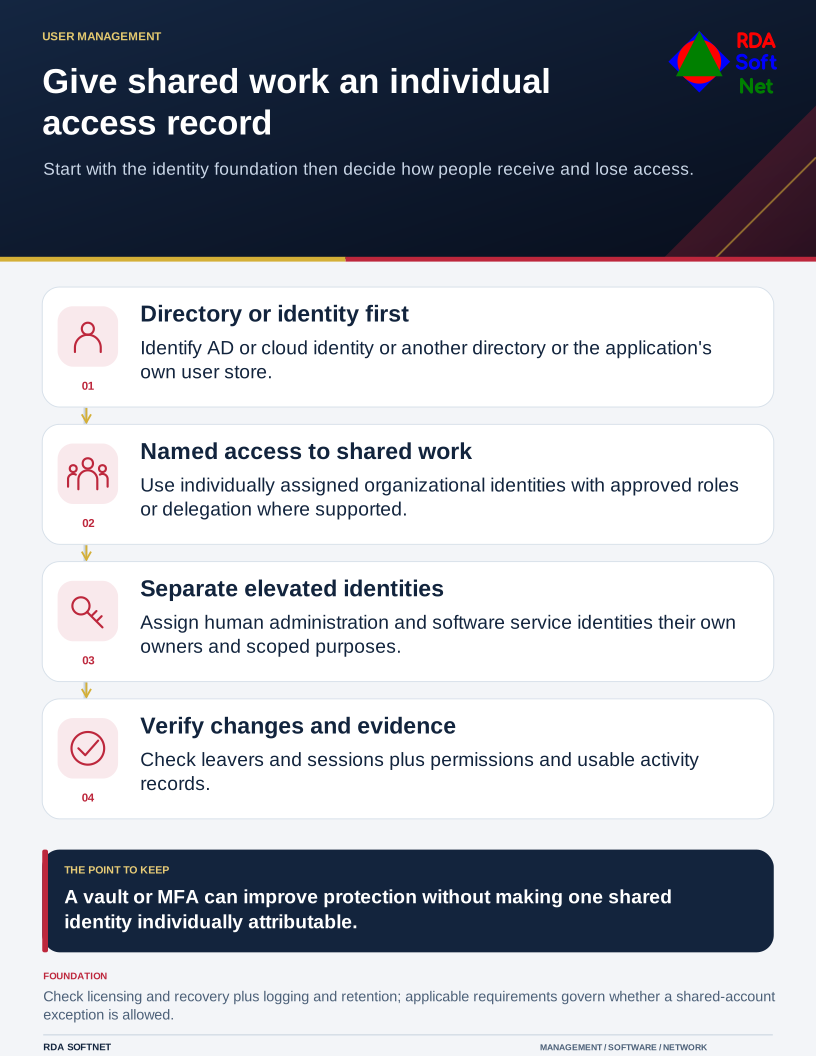
Give shared work an individual access record
Start with the identity foundation then decide how people receive and lose access.
The account is functioning. The process for controlling access has broken down.
Shared logins create a gap between the people doing the work and the records an organization depends on. Closing that gap takes more than choosing a stronger password. It requires clear ownership, appropriate permissions, and a dependable process for granting and removing access.
At RDA, user access belongs in the same operational conversation as staffing, vendor coordination, continuity, and the systems people need to do their jobs.
Start with the identity source
Before creating individual accounts, establish the directory or identity platform that manages them. That may be AD DS and domain controllers, another directory accessed through LDAP, a cloud identity service, or the application’s own user directory. Hybrid environments also need a clear account source and provisioning path. See how directories and Server Roles support User Credentials.
Account approval, application capabilities and licensing, MFA and recovery, logging, and records retention are connected dependencies. Acknowledge them before changing access.
Share the work through individual accounts
A team may need a common inbox, shared files, or access to the same business application. Those resources can often be shared while each person keeps an individual identity.
For example, staff can open a Microsoft 365 shared mailbox through their own accounts after an administrator assigns the appropriate permissions. Microsoft directs organizations to keep direct sign-in blocked for the mailbox itself. The shared email address can remain in place as employees come and go. RDA guide to shared mailboxes
The same principle applies to software with team roles, delegated administration, or individual user licenses. Before distributing an existing password, check what the application already supports.
Individual accounts also need sensible permissions and working audit logs. Review what each person can do and whether the application records the activity you will need to investigate a problem.
Plan access around staff and vendor changes
An account should have a business reason, an owner, and an approval record. Someone in the organization must decide what access the role needs. IT and the application provider then implement and test that decision.
When a person changes responsibilities, their permissions should change with them. When they leave, the removal process should cover their applications, remote access, delegated permissions, recovery methods, and any shared credentials they could use.
A password reset alone may leave other access paths open. Some applications maintain their own active sessions, so disabling a central account does not necessarily end every application session immediately. The departure checklist needs to account for those differences and verify the result. RDA guide to offboarding and access removal
For a small office or a department with limited IT staff, a written checklist makes this work easier to hand off. It also gives management a way to confirm that access was removed without relying on one person's memory.
Treat administrative access as a separate responsibility
An administrator can often change security settings, create accounts, or affect an entire system. Passing that login among staff or outside support teams spreads those permissions and makes investigations harder.
RDA's approach separates ordinary work accounts from administrative access. Human administrators should use individually assigned administrative identities, with access limited to the work they are authorized to perform. Vendor access needs a defined purpose, an approval process, and an end point.
Multi-factor authentication adds protection, but it does not make several people using one identity individually accountable. Forwarding authentication codes or asking a colleague to approve a sign-in also weakens the approval process. Where supported, use phishing-resistant methods such as FIDO2 security keys or appropriately configured passkeys. RDA guide to Credential Security and MFA
Backup jobs and integrations need their own treatment. Their service identities should have documented owners, limited permissions, and a plan for managing credentials. Staff should not borrow those identities for routine work. Emergency access should likewise have a documented recovery procedure and a record of its use.
Check the requirements that apply to the information
The compliance implications depend on the system and the data it handles.
For covered entities using systems that maintain electronic protected health information, HHS explicitly requires a unique identifier for each workforce member so access and activity can be tracked. A shared staff login does not meet that individual identification requirement. RDA guide to User Credentials in HIPAA environments
In CJIS environments, the FBI's policy requires unique identification and authentication of organizational users and defined account management practices. It also addresses changing shared or group authenticators when membership changes. Any proposed exception needs to be evaluated against the applicable policy and agency requirements. RDA guide to User Credentials in CJIS environments
For organizations subject to Massachusetts' 201 CMR 17.00, the computer security requirements include individual identifiers and access limited to people who need the information for their duties. Applicability must be established for the organization and information involved. RDA guide to User Credentials and Massachusetts data security
An internal exception cannot override an applicable requirement. A password vault can improve credential handling, but it cannot by itself supply individual activity records inside an application that records everyone as the same user.
Handle remaining shared accounts through a documented exception
Some equipment and older applications provide only one usable account. Changing that arrangement may require vendor work, a software upgrade, or a planned replacement.
Where the applicable requirements permit continued use, record the reason and assign an owner. Limit who can retrieve the credential, use an approved business password vault, protect access to that vault, and monitor the system as its capabilities allow. Review recovery details and change the credential when an authorized person is removed. Plan and test changes that could interrupt a service or integration.
Give the exception a review date and a practical next step. Otherwise, a temporary workaround can become an undocumented dependency that survives staff changes for years.
Start with the accounts that could cause the most harm
Begin with administrator accounts, email, remote access, and applications holding sensitive or financial information. For each one, establish:
- Who owns the account and approves access.
- Which people and vendors can use it today.
- Whether individual accounts or delegated access are available.
- How access will be removed and how that removal will be checked.
- What records will show who used the system and what they did.
RDA can work with your staff and application vendors to turn those answers into a coordinated access plan, with responsibilities and follow-up work documented. That review connects user management, software capabilities, security controls, and continuity planning to the way your organization actually operates.
Review your User Credentials with RDA.