
Management · Management Operations
Endpoint monitoring, patching and scripting
Remote monitoring, patching, inventory and approved automation for endpoints in the agreed service scope.
Features and benefits
| Feature | Practical benefit |
|---|---|
| Asset discovery and inventory | Device and software records help find unmanaged endpoints, outdated versions and gaps in service coverage. |
| Health monitoring and alerts | Configured monitors identify conditions that need attention before they develop into larger service interruptions. |
| Patch approval and deployment | Pilot groups, maintenance windows and exception handling make operating-system updates more consistent and less disruptive. |
| Scheduled scripts and remediation | Approved automation reduces repetitive work and applies the same tested action across the intended endpoints. |
| Data views and reports | Searchable and exportable inventory and status views support investigation, lifecycle planning and service reviews. |
| Service and remote-support handoff | Approved integrations connect a monitoring condition to a technician, support session and verified work record. |
Endpoint monitoring, patching and scripting
Connect device coverage, monitoring and controlled automation to verified endpoint results.
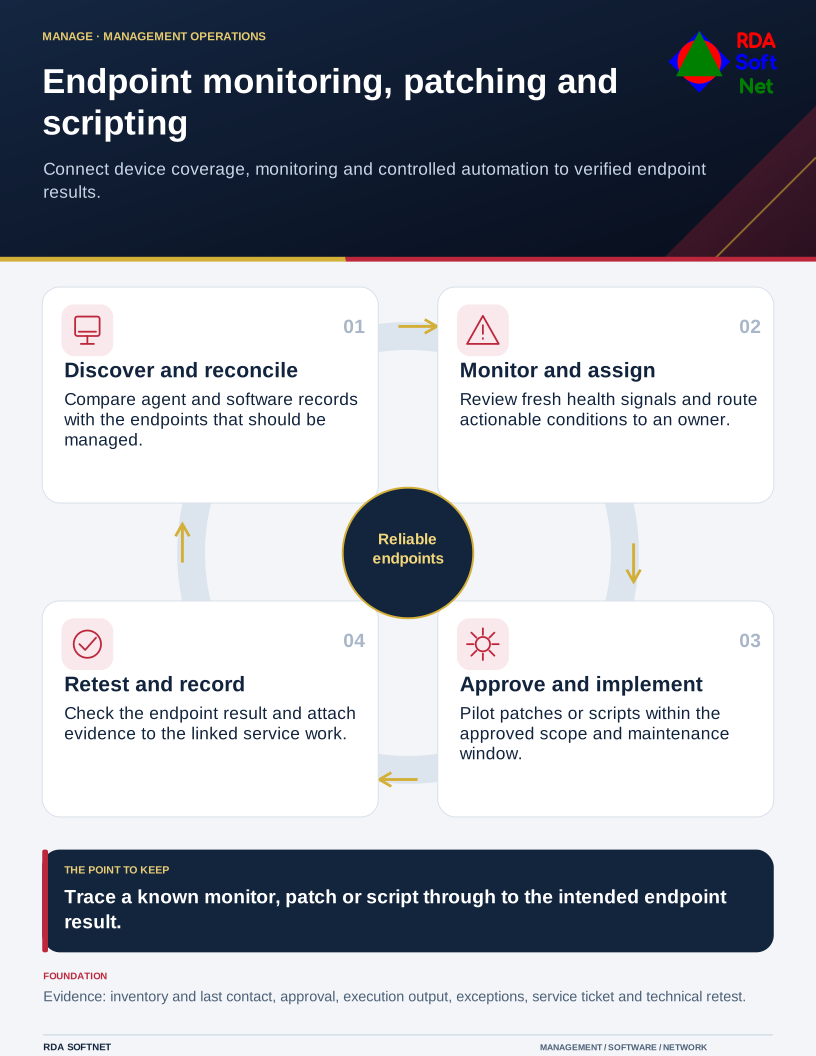
Requirements → deployment → operation → validation
Document library
Requirements and security baseline
Endpoint monitoring, patching and scripting Requirements and security baseline
Baseline alignment. Approved endpoint baselines, patch validation and documented exceptions. CIS IGs · DISA STIGs
- In-scope assets, agent coverage and ownership
- Monitor, patch and script baselines with approved exceptions
- Maintenance windows, change authority and escalation routes
Deployment and control mapping
Endpoint monitoring, patching and scripting Deployment and control mapping
- Scope and ownership: Remote monitoring, patching, inventory and approved automation for endpoints in the agreed service scope.
- Approved rollout and acceptance: Pilot enrollment, inventory and baseline monitors; known-event ticket and controlled patch or script validation
- Applicable requirements mapped to configuration, validation evidence and approved exceptions
Client and user guide
Endpoint monitoring, patching and scripting Client and user guide
- What the management agent supports and how to request help
- Maintenance notices, restart expectations and business impact
- Reporting a failed change or an unmanaged device
Technician training outline
Endpoint monitoring, patching and scripting Technician training outline
- Asset views, agent freshness and monitor interpretation
- Patch approval, script execution and change validation
- monitoring-to-service-desk ticket handoff and technical closure evidence
RDA technician workflow
Endpoint monitoring, patching and scripting RDA technician workflow
- Identify and assess the requirement; plan the scope, accountable owner and required approvals
- Implement and verify: Reconcile live agents with the approved inventory and trace a controlled monitor, patch or script through to a verified result.
- Document the configuration and result; hand off operation, review exceptions and plan lifecycle changes
Portal and access training
Endpoint monitoring, patching and scripting Portal and access training
- Client boundaries and least-privilege technician roles
- Script execution privileges and protected credentials
- Multifactor authentication, access review and offboarding
Training module template
Endpoint monitoring, patching and scripting Training module template
- Learning objectives and prerequisites: asset views, agent freshness and monitor interpretation
- Authorized practical exercise: Reconcile live agents with the approved inventory and trace a controlled monitor, patch or script through to a verified result.
- Knowledge check, observed result and instructor or responsible-owner sign-off
Basic installation and acceptance
Endpoint monitoring, patching and scripting Basic installation and acceptance
- Approved agent prerequisites and client or location setup
- Pilot enrollment, inventory and baseline monitors
- Known-event ticket and controlled patch or script validation
Advanced deployment and changes
Endpoint monitoring, patching and scripting Advanced deployment and changes
- Staged patch deployment and restart coordination
- Approved scripts with pilot, rollback and exception handling
- Additional monitors and false-positive tuning
Technical configuration and integrations
Endpoint monitoring, patching and scripting Technical configuration and integrations
- Client, location, agent and policy relationships
- Service-board routing and integration failure handling
- Inventory, script, patch and alert evidence retention
Operational audit and checklist
Endpoint monitoring, patching and scripting Operational audit and checklist
- Coverage and operating checks: stale agents, unmanaged assets and failed monitors
- Evidence sample: dated inventory or dataview output with last-seen information; linked service tickets with technical validation and exceptions
- Review date and owner; pass or fail, exceptions, corrective action and retest evidence
Tabletop exercises
Endpoint monitoring, patching and scripting Tabletop exercises
- A monitor detects an issue but no service ticket arrives
- A patch or script disrupts a business application
- An endpoint is missing from management coverage
Response playbook
Endpoint monitoring, patching and scripting Response playbook
- Assess asset impact and validate the observed condition
- Choose an authorized repair, rollback or escalation
- Retest the endpoint and close the linked work record
Operational runbooks
Endpoint monitoring, patching and scripting Operational runbooks
- Recover an offline or unhealthy management agent
- Pilot and validate an approved patch or script
- Trace a monitor ticket and resolve a routing failure
Evaluation and lifecycle review
Endpoint monitoring, patching and scripting Evaluation and lifecycle review
Selection and fit. Compare viable options against the business need, security requirements, existing systems and full operating cost. Record the reasons for the selection, the tradeoffs accepted and the conditions that would prompt a different choice.
Keeping the choice current. Follow supplier notices between scheduled reviews and reassess before renewal or a material change. Check ownership changes, renamed or retired products, subscription and licensing terms, pricing, capabilities and support commitments. Record the effect on security, data handling, integrations and service continuity. Assign an owner to approve adjustments or plan a transition, including data export and removal of access.
- Endpoint coverage and technical-result quality
- Patch and script safety, integrations and exception workload
- License scope, training and total operating effort