
Management · Management Operations
Remote support sessions
Authorized remote support tied to a named technician, an approved request and a documented result.
Features and benefits
| Feature | Practical benefit |
|---|---|
| Attended remote support | An authorized session lets a technician investigate and resolve problems with the user without waiting for an onsite visit. |
| Approved unattended access | Configured endpoint access supports maintenance and troubleshooting when direct user participation is not required. |
| Remote diagnostics and support actions | Permitted administrative actions help investigate and repair an endpoint through the same controlled support connection. |
| Access and session controls | Named operators, authentication and scoped permissions limit who can connect and what they can do. |
| Session auditing and recording | Available timeline and configured recording details support accountability and investigation of the work performed. |
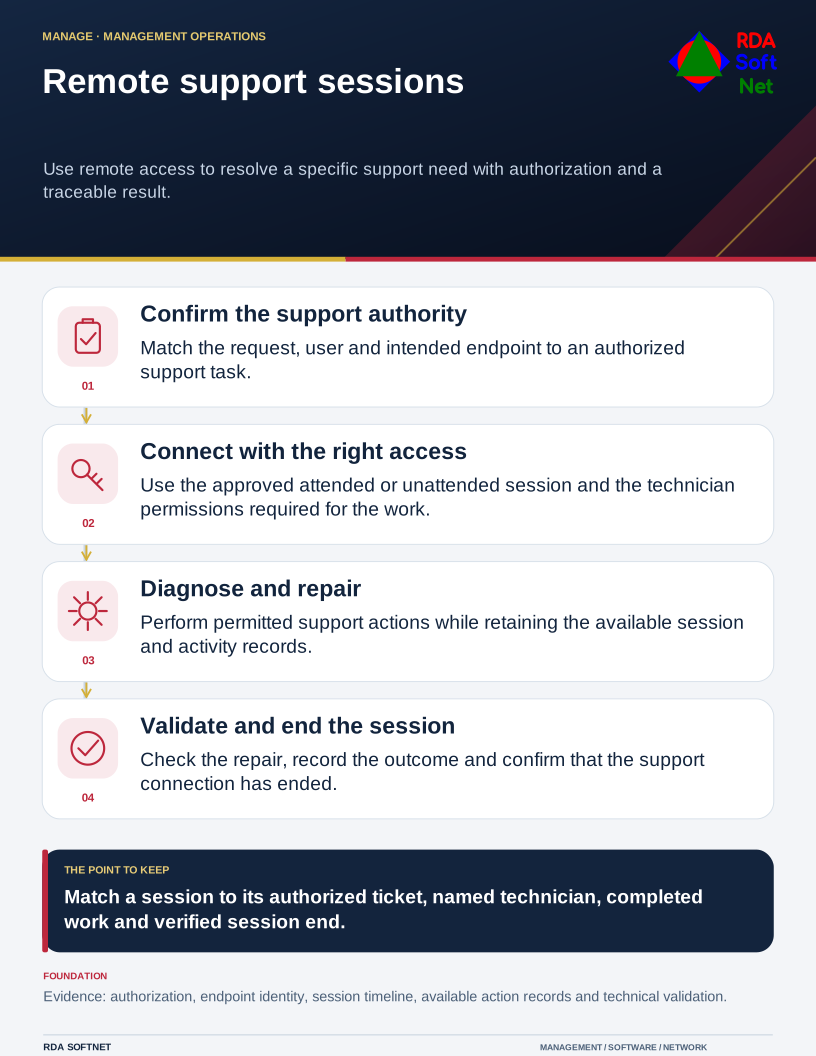
Remote support sessions
Use remote access to resolve a specific support need with authorization and a traceable result.
Requirements → deployment → operation → validation
Document library
Requirements and security baseline
Remote support sessions Requirements and security baseline
Baseline alignment. Remote access and administrative safeguards selected for the agreed CIS IG. CIS IGs
- Approved support endpoints and session types
- Technician roles, multifactor authentication and session authority
- Audit, recording, consent and retention requirements
Deployment and control mapping
Remote support sessions Deployment and control mapping
- Scope and ownership: Authorized remote support tied to a named technician, an approved request and a documented result.
- Approved rollout and acceptance: Pilot session with the intended permission and consent model; identity, audit and connection-termination acceptance
- Applicable requirements mapped to configuration, validation evidence and approved exceptions
Client and user guide
Remote support sessions Client and user guide
- Recognizing an authorized support request
- Session participation, consent and reporting suspicious access
- Confirming the service result and ending a support session
Technician training outline
Remote support sessions Technician training outline
- Session selection, endpoint identity and authorization checks
- Approved commands, transfers and support actions
- Session audit review and ticket-result documentation
RDA technician workflow
Remote support sessions RDA technician workflow
- Identify and assess the requirement; plan the scope, accountable owner and required approvals
- Implement and verify: Match a remote session to the authorized ticket and technician, then verify the repair and the recorded session end.
- Document the configuration and result; hand off operation, review exceptions and plan lifecycle changes
Portal and access training
Remote support sessions Portal and access training
- Named operator accounts and least-privilege permissions
- Unattended access, support groups and session boundaries
- Access review, emergency access and operator removal
Training module template
Remote support sessions Training module template
- Learning objectives and prerequisites: session selection, endpoint identity and authorization checks
- Authorized practical exercise: Match a remote session to the authorized ticket and technician, then verify the repair and the recorded session end.
- Knowledge check, observed result and instructor or responsible-owner sign-off
Basic installation and acceptance
Remote support sessions Basic installation and acceptance
- Approved host or access-agent prerequisites
- Pilot session with the intended permission and consent model
- Identity, audit and connection-termination acceptance
Advanced deployment and changes
Remote support sessions Advanced deployment and changes
- Support groups and restricted session capabilities
- Extended auditing or recording where selected and supported
- Agent updates and controlled unattended-access changes
Technical configuration and integrations
Remote support sessions Technical configuration and integrations
- Endpoint-to-session mapping and network dependencies
- Ticket linkage, command audit and recording configuration
- Storage, retention and approved integration settings
Operational audit and checklist
Remote support sessions Operational audit and checklist
- Coverage and operating checks: unrecognized sessions and unintended persistent access
- Evidence sample: session timeline and operator or endpoint connection records; authorized ticket, performed work and validated support outcome
- Review date and owner; pass or fail, exceptions, corrective action and retest evidence
Tabletop exercises
Remote support sessions Tabletop exercises
- A user receives an unexpected remote-access request
- A technician connects to the wrong endpoint
- Session auditing or recording is unavailable during an incident
Response playbook
Remote support sessions Response playbook
- Verify identity, authority and the affected endpoint
- Authorize support or terminate and escalate suspicious access
- Validate the repair, session closure and retained evidence
Operational runbooks
Remote support sessions Operational runbooks
- Start and end an authorized support session
- Collect session audit details for a service ticket
- Remove unneeded access and confirm termination
Evaluation and lifecycle review
Remote support sessions Evaluation and lifecycle review
Selection and fit. Compare viable options against the business need, security requirements, existing systems and full operating cost. Record the reasons for the selection, the tradeoffs accepted and the conditions that would prompt a different choice.
Keeping the choice current. Follow supplier notices between scheduled reviews and reassess before renewal or a material change. Check ownership changes, renamed or retired products, subscription and licensing terms, pricing, capabilities and support commitments. Record the effect on security, data handling, integrations and service continuity. Assign an owner to approve adjustments or plan a transition, including data export and removal of access.
- Authorization and session accountability
- Audit depth, retention and supported endpoint scope
- Connectivity, operator usability and total cost