
Management · Management Operations
Email protection and security awareness
Email filtering and security-awareness activities identified in RDA’s stack, with product and license scope recorded separately.
Features and benefits
| Feature | Practical benefit |
|---|---|
| Email threat filtering | Spam, phishing and malicious-message checks reduce harmful content reaching users through the protected mail path. |
| Link and attachment protection | Additional URL and attachment analysis can reduce exposure to suspicious content when included in the selected package. |
| Quarantine and user digests | Held-message review gives users a controlled way to recover legitimate mail while keeping risky messages out of the inbox. |
| Continuity and protected messaging | Continuity, encryption and data-loss controls support availability and information handling where the relevant options are licensed and configured. |
| Awareness training and simulations | Assigned learning and licensed phishing exercises help users recognize threats and practice reporting them. |
| Mail and learning reports | Message decisions, training completion and reporting behavior reveal protection gaps and where follow-up is needed. |
Email protection and security awareness
Combine protected mail flow, safe message handling and user readiness to reduce email risk.
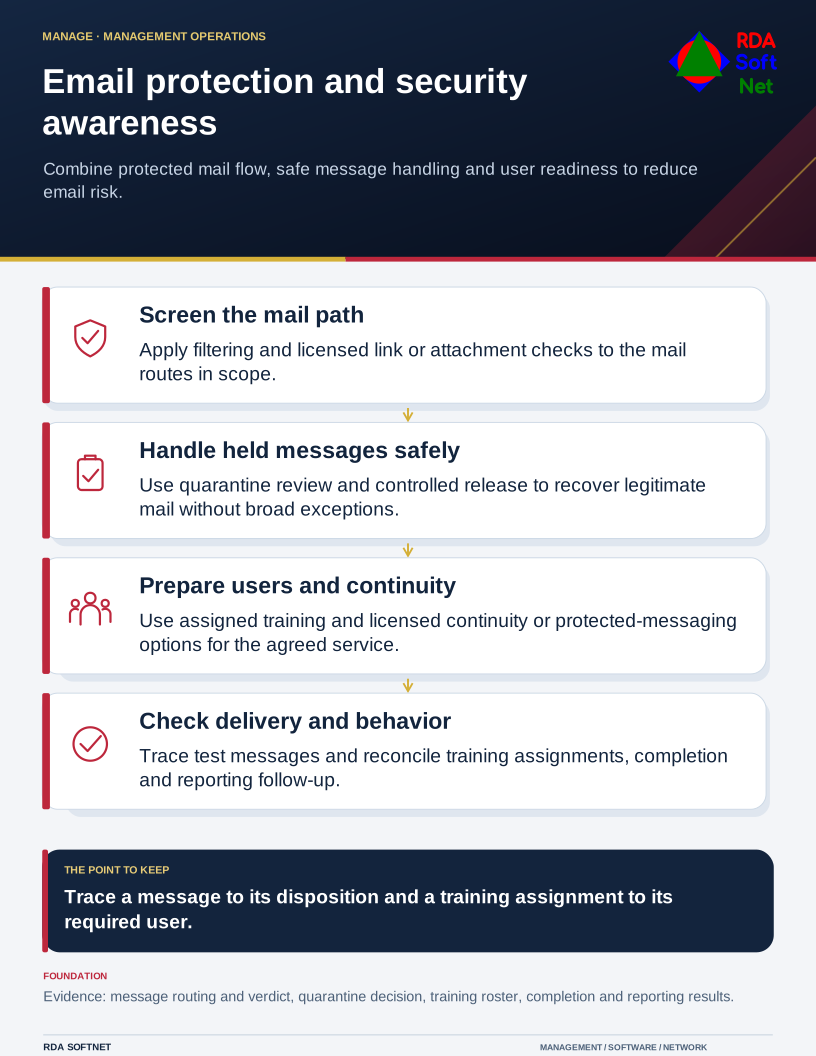
Requirements → deployment → operation → validation
Document library
Requirements and security baseline
Email protection and security awareness Requirements and security baseline
Baseline alignment. Email protection and awareness safeguards selected for the agreed CIS IG. CIS IGs
- Protected mail domains, mail paths and responsible owners
- Filtering policy, quarantine access and sender exceptions
- Awareness-training population, reporting route and privacy requirements
Deployment and control mapping
Email protection and security awareness Deployment and control mapping
- Scope and ownership: Email filtering and security-awareness activities identified in RDA’s stack, with product and license scope recorded separately.
- Approved rollout and acceptance: Pilot users, filtering policy and digest configuration; representative permitted and quarantined message checks
- Applicable requirements mapped to configuration, validation evidence and approved exceptions
Client and user guide
Email protection and security awareness Client and user guide
- Quarantine digest, message review and safe release decisions
- Reporting suspicious mail and requesting support
- Assigned awareness training and follow-up responsibilities
Technician training outline
Email protection and security awareness Technician training outline
- Mail-flow tracing, verdict interpretation and quarantine investigation
- Safe exception handling and release authorization
- Training assignments, completion gaps and reported-phish follow-up
RDA technician workflow
Email protection and security awareness RDA technician workflow
- Identify and assess the requirement; plan the scope, accountable owner and required approvals
- Implement and verify: Trace an approved test message through filtering and delivery, then reconcile training assignments to the required user population.
- Document the configuration and result; hand off operation, review exceptions and plan lifecycle changes
Portal and access training
Email protection and security awareness Portal and access training
- Administrative roles and protected-domain boundaries
- User sign-in, quarantine permissions and account lifecycle
- API entitlement, service credentials and access review
Training module template
Email protection and security awareness Training module template
- Learning objectives and prerequisites: mail-flow tracing, verdict interpretation and quarantine investigation
- Authorized practical exercise: Trace an approved test message through filtering and delivery, then reconcile training assignments to the required user population.
- Knowledge check, observed result and instructor or responsible-owner sign-off
Basic installation and acceptance
Email protection and security awareness Basic installation and acceptance
- Domain and routing prerequisites for the selected product
- Pilot users, filtering policy and digest configuration
- Representative permitted and quarantined message checks
Advanced deployment and changes
Email protection and security awareness Advanced deployment and changes
- Staged mail-flow changes and rollback planning
- Approved policy tuning and narrowly scoped sender exceptions
- Awareness campaign setup for the licensed training product
Technical configuration and integrations
Email protection and security awareness Technical configuration and integrations
- DNS and mail-routing dependencies with documented bypass paths
- Message-log identifiers and approved event or ticket integration
- Training roster source, report exports and retention
Operational audit and checklist
Email protection and security awareness Operational audit and checklist
- Coverage and operating checks: mail-flow health, bypasses and unresolved quarantine issues
- Evidence sample: message-log detail showing route, verdict and disposition; training assignment, completion and simulation results where licensed
- Review date and owner; pass or fail, exceptions, corrective action and retest evidence
Tabletop exercises
Email protection and security awareness Tabletop exercises
- A phishing message reaches an intended recipient
- A legitimate critical message is quarantined
- Mail delivery disruption or a missed training population
Response playbook
Email protection and security awareness Response playbook
- Assess message context, affected recipients and business impact
- Decide on release, containment or escalation with authorization
- Verify mail flow, user notification and corrective follow-up
Operational runbooks
Email protection and security awareness Operational runbooks
- Trace a message and retain its log reference
- Review quarantine and process an authorized exception
- Reconcile training assignments and record completion follow-up
Evaluation and lifecycle review
Email protection and security awareness Evaluation and lifecycle review
Selection and fit. Compare viable options against the business need, security requirements, existing systems and full operating cost. Record the reasons for the selection, the tradeoffs accepted and the conditions that would prompt a different choice.
Keeping the choice current. Follow supplier notices between scheduled reviews and reassess before renewal or a material change. Check ownership changes, renamed or retired products, subscription and licensing terms, pricing, capabilities and support commitments. Record the effect on security, data handling, integrations and service continuity. Assign an owner to approve adjustments or plan a transition, including data export and removal of access.
- Mail protection, false positives, continuity and awareness outcomes
- Selected mail and training packages, encryption and data-loss options
- Protected mail paths, export limits and total operating cost