
A browser extension can make a small task easier while gaining access to much more important work. The same browser may hold an open customer database, financial application, and document library. That makes an extension request a permission decision, even when the tool is free and the installation takes seconds.
Make extension permission a review decision
The browser may already contain access to important organizational systems.
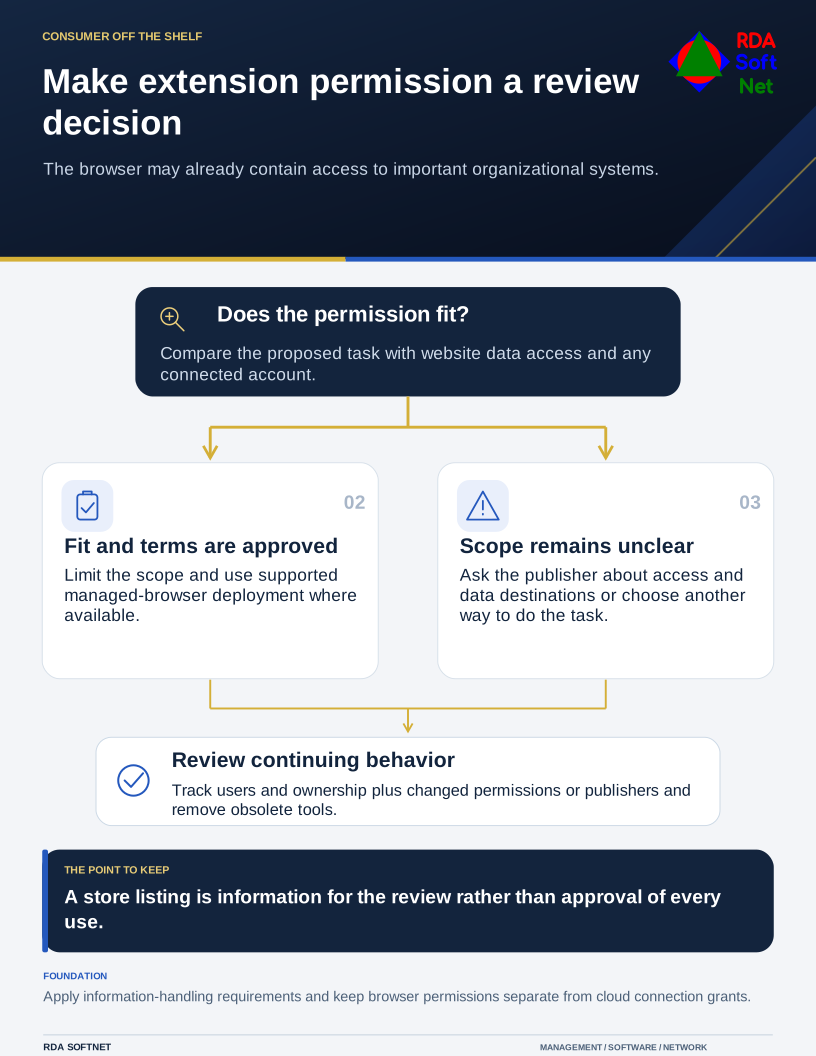
The review should be proportionate. A simple utility restricted to one approved site and an add-on asking to read many sites deserve different attention. Neither should be judged only by its download count or the convenience of its demonstration.
Match the permission to the purpose
Write down the task the extension will perform and the information it must reach. Compare that with the requested permissions and any external accounts it connects to. If the scope seems broader than the function, ask the publisher for an explanation or consider another way to do the task.
Google's extension permission risk guidance is intended to help administrators evaluate those requests. Its permission descriptions explain that access to website data can include reading or changing page content. The implications depend on the particular permission and implementation.
The application integration guide provides the wider ownership questions. Who requested the connection, who can approve it, and who will remove it when the use ends? Browser access and an OAuth connection may need separate review even when presented as one product.
Review the supplier and the data path
Confirm the publisher, support contact, update history, and applicable terms. Understand whether information stays within the browser or is sent to a service. Check retention, sharing, and deletion arrangements for the data involved.
Use the vendor review guide to focus on the actual exposure. A store listing or privacy policy can supply information, but it does not establish that every use is appropriate for the organization. Customer, personnel, health, or public safety information may impose requirements that a general productivity tool cannot meet.
Apply data handling rules to the proposed workflow. A user should not have to guess whether a grammar helper may process a confidential report or whether a screenshot tool may upload a business application screen.
Manage it after approval
Record the extension, approved purpose, users, permission scope, and review owner. Use managed browser controls where available to deploy permitted extensions and restrict others. Confirm how those controls behave on remote devices and different browser profiles.
The endpoint security guide connects that work with the managed device baseline. Review significant permission changes, publisher changes, unexpected behavior, or a use that expands into more sensitive information. Remove tools that no longer have a purpose.
A quick initial screen is valuable, but it cannot guarantee an extension's future safety. The practical outcome is a clear approval, a limited scope, and a maintained record of the tools operating inside the place where much of the organization's daily work now happens.