Management · Management Operations
Controlled documents and document workflows
Document automation and controlled document changes, with the actual workflow engine identified separately.
Features and benefits
| Feature | Practical benefit |
|---|---|
| Document libraries and metadata | Organized libraries, properties and views make approved information easier to find and maintain. |
| Version history and recovery | Retained document versions show how content changed and allow an authorized return to an earlier version. |
| Controlled publication | Configured approval and draft visibility separate work in progress from the document readers should use. |
| Co-authoring and scoped access | Compatible documents can be edited collaboratively while permissions control who can view or change them. |
| Document workflow integration | The configured automation engine can route reviews, update records and notify owners, with its execution evidence retained separately. |
Controlled documents and document workflows
Connect collaborative document work to a controlled published version and the intended audience.
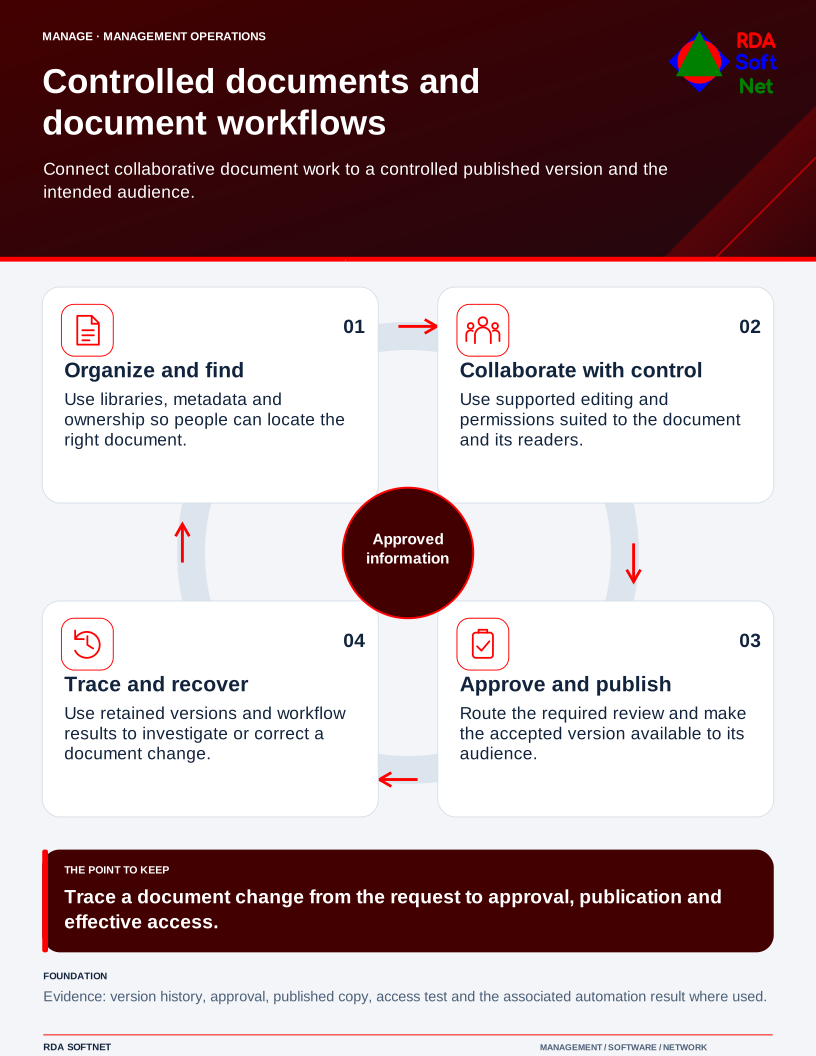
From a requirement to a maintained document
Illustrative document workflow
A policy needs an owner, an approved version and a review path. RDA connects that document to the people who use it, the training that explains it and the evidence of the work it supports.
- Identify the need. Record the applicable requirement, document owner and intended readers.
- Prepare and review. The author and reviewers check the draft against the actual work and the responsibilities of RDA, client staff and other providers.
- Approve and publish. The authorized approver accepts the version; staff receive the current document and any training the change needs.
- Keep the record. Retain the version, approval, communication and relevant work or training evidence.
- Review again. A changed requirement, system, responsibility or observed problem brings the document back to its owner, alongside the agreed review date.
Workflow automation supports review assignments, reminders and visible progress. It also needs a responsible person when a step fails or remains overdue. The workflow records the decision; an authorized person makes it.
The policy maintenance example shows how these responsibilities fit together. Public outlines explain the structure; complete working documents, permissions and detailed instructions belong in the approved member area.
Requirements → deployment → operation → validation
Public resource outlines
These short outlines show the resources connected to this function. Complete working documents, organization-specific procedures and access details belong in the approved member area.
Requirements and security baseline
The document purpose, accountable owner, intended readers and approval responsibilities, with review triggers and retention recorded.
Deployment and control mapping
How a document moves from draft through review and approval to the version staff should use, with its publication record retained.
Client and user guide
How client staff find the approved version, understand the responsibilities it describes and raise a correction or exception.
Technician training outline
How RDA staff prepare changes, coordinate review and check that the published document and related instructions agree.
RDA technician workflow
The handoffs among author, reviewer, authorized approver and document owner, supported by reminders and visible follow-up.
Portal and access training
The responsibilities for authorized access, role changes and departure, with individual access details kept in the approved member area.
Training module template
An outline connecting the learner, objective, current material, representative exercise and observed result.
Basic installation and acceptance
The preparation and acceptance topics used when a service is introduced or its responsibilities change.
Advanced deployment and changes
How a significant change is reviewed for its effect on people, connected services and continuing support.
Technical configuration and integrations
An overview of the service dependencies and responsible parties; configuration and access instructions belong in the approved member area.
Operational audit and checklist
A check of ownership, current versions, review dates and publication or training records against the agreed document responsibilities.
Tabletop exercises
Discussion prompts that help RDA and client staff practice roles, decisions and handoffs without changing live systems.
Response playbook
The people, decision points and review responsibilities involved when normal service is interrupted.
Operational runbooks
Descriptions of recurring operating tasks and their expected results; detailed working instructions belong in the approved member area.
Evaluation and lifecycle review
How the document process remains useful as requirements, staff responsibilities, services or provider terms change.